Looks like the hackers arn't giving up so easily yet !! The new hack from Deltafox over at symbian freak lets you unlock your nopkia phone from the shackles of symbian signing .
The hack has been confirmed to work on the following phones/firmware.
Nokia N82 firmware version 30.0.019 and 31.0.016
Nokia N95 firmware version 31.0.017
Nokia N95 8GB firmware version 31.0.015
Nokia E90 Communicator version 300.34.84
Nokia E71 firmware versions 110.07.127 and 200.21.188
The procedure :
1. Check if you can hack your phone with the HelloCarbide and ROMPatcher method. If you can, use that method instead. Only use the method below if nothing else works.
2. Get a developer certificate. Be patient, it can take a while before your certificate is ready.
3. Download this package from Mobile Castle.
4. BACK UP YOUR PHONE MEMORY! On some phones you'll need to click "Memory" in the settings folder, on other phones you can back up your phone memory from the options menu in the file manager. You can also back up your phone memory with PC Suite.
5. Sign MapDrives (which you downloaded in step 3) with the certificate you got in step 2, and install the signed copy of MapDrives on your phone.
6. Copy MapDrives.txt to your memory card (E:\), so you'll get E:\MapDrives.txt.
7. Install JBak TaskMan, start it, press the # key, highlight the MapDrives entry, click "options," "program rules," and select "autostart."
8. Restart your phone.
9. Delete MapDrives and install MapDrive_JBakTM_EMU_Y (for N82, N95, N95-8GB, and other phones that have a drive called Y:\), and start it.
10. Install Modo, and use the Modo file manager to copy installserver.exe to C:\sys\bin.
11. Once the modified installserver.exe is copied to C:\sys\bin you don't need MapDrives and JBak anymore, but you still need Modo to write to C:\sys.
Note: with this hack you can not write to C:\sys and other system folders with file managers like X-plore or ActiveFile. You can read C:\sys\bin with these file managers, but you can only write to C:\sys\bin with Modo.
Confirmed to work on these phones and firmware versions:
Nokia N82 firmware version 30.0.019 and 31.0.016
Nokia N95 firmware version 31.0.017
Nokia N95 8GB firmware version 31.0.015
Nokia E90 Communicator version 300.34.84
Nokia E71 firmware versions 110.07.127 and 200.21.188
For more information , head over here :
Symbian Freak (login required)
Symbian Underground

Showing posts with label Nokia N95. Show all posts
Showing posts with label Nokia N95. Show all posts
Wednesday, 28 January 2009

Friday, 25 July 2008
Nokia E71 : Initial Observations !
The great people at Womworld sent me a Nokia E71 to trial. This device is everything you have read about it and much much more..!! I was seriously skeptical about how much praise was being heaped on this "E-Series-Posterboy" phone, but once you get your hands on this stunner ..trust me ....you wont feel like looking at any other e series phones ... ever ! I'm sure a lot of people are going to dump their blackberrys for this baby !
This is only the review of the physical features of the E71. I will be posting a detailed software review later.
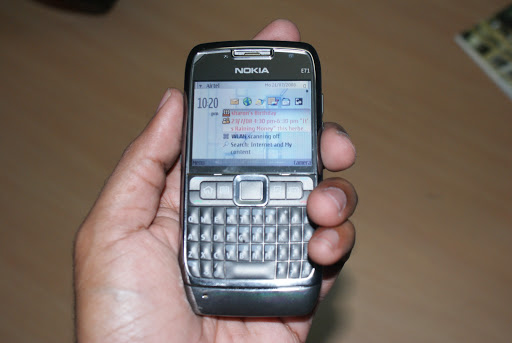
As you can see in the picture ... the E71 looks absolutely stunning , The amazing metallic finish feels good to look at and to hold too. Also as with the other newer E-series phones .The phone runs on symbian OS 9.2 and has the new "home" and "delete" keys .. and also features a "CTRL"(which i'm assuming is used to in VPN and Remote Admin functions) function on the dedicated "special characters" button.Also visible in the picture are the Dedicated calendar , phone book and messages button.Also hiding beneath somewhere is the GPS chip. this is the second E-series phone to get inbuilt GPS functionality after the E90. The GPS lock on is fast and takes under 10 seconds as compared to nearly a minute on my N95.The full qwerty keypad is amazing ! it might look minuscule here ... but the buttons are so well contoured that even a guy like me with big fingers can easily use the keypad without pressing two keys at once. Also the combination of predictive text + auto correction + qwerty keypad makes typing out even the lengthiest emails on this device a real breeze.
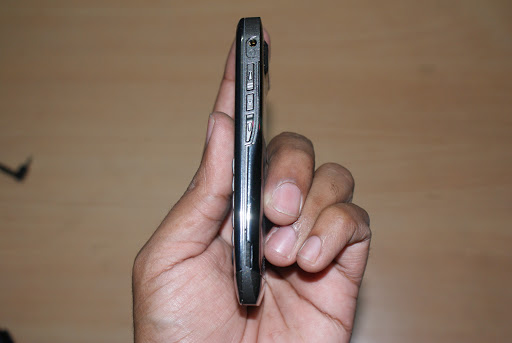
The side view of the E71 , in all its stunning glory.The only disappointment here was 2.5 mm headphone jack in lieu of the standard 3.5mm one , but i guess it had to be done due to space constraints. So this means you cant use your normal mp3 player headphones like you can in the N95 and certain other N series phones. There button with the dot in the center is used to mute calls.
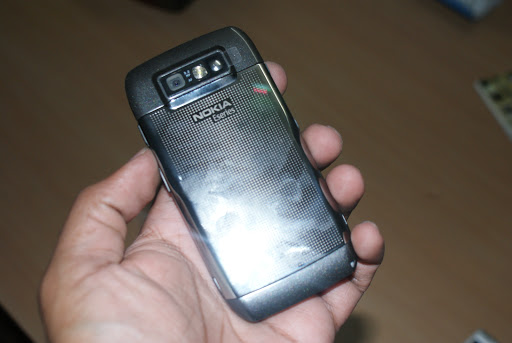
The back casing of the E71 has a nice feel to it. All the squares you can see are actually carved into the metallic cover , which ensures that this sleek phone does not slip out of your hand under any conditions.Also provided is a 3.2 megapixel camera with auto focus & geo tagging , and a LED flash.The E71 also does away with the front camera found in most N series phones. The camera quality is fairly acceptable for an E-series phone , and cannot be compared to the likes of the N73 or the N95 for that matter. Still , I wish the camera was a little better .
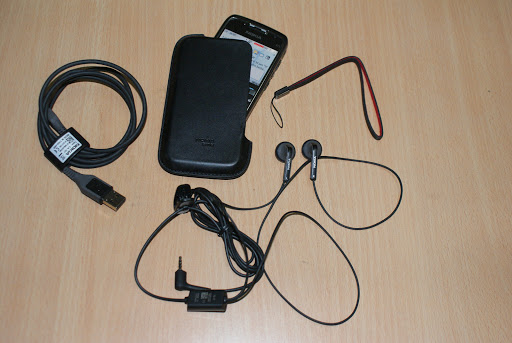
These are some of the accessories that come with the E71 box. A nice red and black lanyard and Case. The case is of really good quality and has a nice red interior and looks very very classy (a nice addition to those Armani suits :P ) . Also included are a 2.5mm headset and the usb data cable (unlike Motorola and Samsung ...you cannot charge the phone with this) and a travel charger.
Comparisons with the Nokia N95 : (physical features)
The E71 is THIN !! Just comparing it with my N95 was like comparing the size of a mac book air to a Panasonic toughbook !!
And I dunno how nokia engineers managed to squeeze a full qwerty keypad in there ...but I must say ..its real impressive to see the amount of stuff they've crammed into this device !
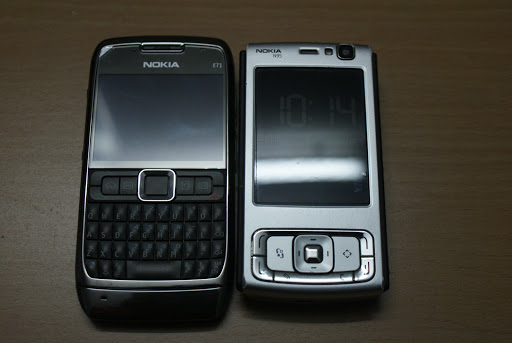
The E71 as you can see is only slightly longer than the N95 in the closed state.
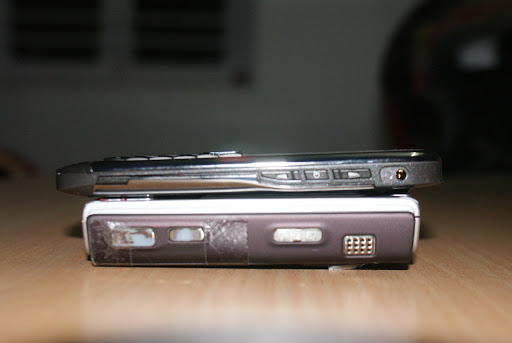
In terms of thickness ... There is no comparison at all !! The E71 is wafer thin as compared to the N95 .. which is really good for all those business suits out there ...so you don't have an awkward bulge sticking out of your trouser/suit pockets !

This concludes my review of the physical features of the E71. I will be posting a detailed software review of the device and its features later. Do let me know if you have any questions about the device and i will try to answer them in my next post. :)
This is only the review of the physical features of the E71. I will be posting a detailed software review later.
As you can see in the picture ... the E71 looks absolutely stunning , The amazing metallic finish feels good to look at and to hold too. Also as with the other newer E-series phones .The phone runs on symbian OS 9.2 and has the new "home" and "delete" keys .. and also features a "CTRL"(which i'm assuming is used to in VPN and Remote Admin functions) function on the dedicated "special characters" button.Also visible in the picture are the Dedicated calendar , phone book and messages button.Also hiding beneath somewhere is the GPS chip. this is the second E-series phone to get inbuilt GPS functionality after the E90. The GPS lock on is fast and takes under 10 seconds as compared to nearly a minute on my N95.The full qwerty keypad is amazing ! it might look minuscule here ... but the buttons are so well contoured that even a guy like me with big fingers can easily use the keypad without pressing two keys at once. Also the combination of predictive text + auto correction + qwerty keypad makes typing out even the lengthiest emails on this device a real breeze.
The side view of the E71 , in all its stunning glory.The only disappointment here was 2.5 mm headphone jack in lieu of the standard 3.5mm one , but i guess it had to be done due to space constraints. So this means you cant use your normal mp3 player headphones like you can in the N95 and certain other N series phones. There button with the dot in the center is used to mute calls.
The back casing of the E71 has a nice feel to it. All the squares you can see are actually carved into the metallic cover , which ensures that this sleek phone does not slip out of your hand under any conditions.Also provided is a 3.2 megapixel camera with auto focus & geo tagging , and a LED flash.
These are some of the accessories that come with the E71 box. A nice red and black lanyard and Case. The case is of really good quality and has a nice red interior and looks very very classy (a nice addition to those Armani suits :P ) . Also included are a 2.5mm headset and the usb data cable (unlike Motorola and Samsung ...you cannot charge the phone with this) and a travel charger.
Comparisons with the Nokia N95 : (physical features)
The E71 is THIN !! Just comparing it with my N95 was like comparing the size of a mac book air to a Panasonic toughbook !!
And I dunno how nokia engineers managed to squeeze a full qwerty keypad in there ...but I must say ..its real impressive to see the amount of stuff they've crammed into this device !
The E71 as you can see is only slightly longer than the N95 in the closed state.
In terms of thickness ... There is no comparison at all !! The E71 is wafer thin as compared to the N95 .. which is really good for all those business suits out there ...so you don't have an awkward bulge sticking out of your trouser/suit pockets !

This concludes my review of the physical features of the E71. I will be posting a detailed software review of the device and its features later. Do let me know if you have any questions about the device and i will try to answer them in my next post. :)
Monday, 12 November 2007
N95 light sabre
After the discovery of the N95's hidden accelerometer the apps just keep pouring in. The latest from the scene is the Light sabre app ..which does exactly what the name says. If you want to install the app ...you will first have to install the plugin for the accelerometer (if you dont already have it ) from :
here
And Download the light sabre app from :
here
There's also a video of symbian guru Ricky cadden dishing out some Jedi justice.
The force is strong with this one !! :)
here
And Download the light sabre app from :
here
There's also a video of symbian guru Ricky cadden dishing out some Jedi justice.
The force is strong with this one !! :)
Wednesday, 7 November 2007
The S.E shake-&-change-your-song feature comes to the Nokia N95
The recently discovered accelerometer hack has spurred a lot of developers into developing apps that utilize this feature of the nokia N95. My only question is ..why did nokia take so long to tell us about the accelerometer hidden inside the nokia N95..Or more interestingly ..why havnt they developed any apps that actually put it to good use ? Anyways ...some enterprising hackers have managed to fin a way to replicate SE's shake and change the music track feature on the Nokia N95. Its so cool to look at. I cant wait for this app to be released in public. Check out the video below.
Thursday, 1 November 2007
N95 Accelerometer in action...
Soon after the news of the new rotate me application that uses the built in level sensor...
This is awesome. I searched for videos of this on the net and couldnt find any ..so i had to post one of my own. I wonder why nokia has not developed any applications that use this yet ? It would unleash the true potential of the N95.For those of you interested in Downloading the app..you can find it here :
http://research.nokia.com/projects/activity_monitor
1.Install the N95 RD Accelerometer Plug-in package (there is a sis file inside the .zip file...thats all you need)
2.Install the MovingBall_Example.sisx to your phone.
3.Enjoy killing time with this awesome app !! :)
Expect to see more apps using this awesome functionality to be released soon...
This is sooooooo coool !!
This is awesome. I searched for videos of this on the net and couldnt find any ..so i had to post one of my own. I wonder why nokia has not developed any applications that use this yet ? It would unleash the true potential of the N95.For those of you interested in Downloading the app..you can find it here :
http://research.nokia.com/projects/activity_monitor
1.Install the N95 RD Accelerometer Plug-in package (there is a sis file inside the .zip file...thats all you need)
2.Install the MovingBall_Example.sisx to your phone.
3.Enjoy killing time with this awesome app !! :)
Expect to see more apps using this awesome functionality to be released soon...
This is sooooooo coool !!
Monday, 20 August 2007
Nokia N95 8GB details outed by FCC


I am totally speechless !! It's beautiful !! A bigger screen , gorgeous black finish...Higher capacity battery.. 8 gigs of internal memory !! And it also comes with built in support for nokia's soon to be launched music store and n-gage platform !! This is gonna sell like hotcakes . Now if only they get the pricing right.. :)
Head over to Allaboutsymbian to read more.
Sunday, 19 August 2007
Nokia N95 APAC Firmware V12.0.014 out !!
Nokia has released a firmware update for all the APAC users of the N95. The change log isn't out yet ..so no Idea of what has changed...but considering the .014 version ...i'm sure they must have fixed the keypress bug and other minor bugs. In case you want to update your N95 ..download the nokia software updater from HERE

And do let me know about what has changed !! :)
Updated Link

And do let me know about what has changed !! :)
Updated Link
Friday, 10 August 2007
US 3G Nokia N95 to get More Ram and More juice !!
Ricky the Symbian Guru has just got the latest scoop on the tech specs of the Yet to be launched US 3G version of the Nokia N95.

Apparently the Battery capacity has been upped to 1200 mAH (BL-6F) ...and the RAM has been increased to a whopping 128 MB. WOW !!
This is the Update we've all been waiting for . Although existing N95 users wont be able to upgrade the ram on their phones... We can at least go in for the new higher capacity battery (If it is of the same form factor ...that is! ) . Cant wait for those battery packs to get to India. :)
Head over to Ricky's Blog top read more...
http://symbianguru.typepad.com/welcome/2007/08/us-3g-nokia-n-1.html

Apparently the Battery capacity has been upped to 1200 mAH (BL-6F) ...and the RAM has been increased to a whopping 128 MB. WOW !!
This is the Update we've all been waiting for . Although existing N95 users wont be able to upgrade the ram on their phones... We can at least go in for the new higher capacity battery (If it is of the same form factor ...that is! ) . Cant wait for those battery packs to get to India. :)
Head over to Ricky's Blog top read more...
http://symbianguru.typepad.com/welcome/2007/08/us-3g-nokia-n-1.html
Monday, 6 August 2007
Hands on with Zonetag v3.0 for Symbian
Yahoo Research Berkeley has finally released the S60 v3 version of Zonetag. Zonetag was one of those apps which worked beautifully on s60 v2 phones ,letting you upload your photos to flickr or your blog , at the same time allowing you to tag them with location specific tags. The new version for s60v3 devices does all this and more .. !!!
To download the app for your symbian phone you will first need a yahoo ID . The next step would be to go to http://zonetag.research.yahoo.com/managezt.php and login using your yahoo account. After logging in you should be greeted with a screen like this.

Just click on the install button on the top of the screen and you can choose between having the link sent to your mobile (cingular and t-mobile only ) , download via web browser ..or download the app to your p.c. After choosing the correct s60 edition.. You are all set to go.

I downloaded the App using the web link method. The installation was pretty straightforward. If the app asks you for a code while installing , you have to get it from the yahoo zonetag page you logged into on your p.c .

The best part about the new s60 v3 version is that it supports the internal GPS of the nokia N95. It can automatically get your current coordinates and embed these into the EXIF data when you click a snap. But mind you .. Zonetag has to be up and running in the background , and you should have a GPS fix on the satellites if you want the photo to be tagged.

You can tag the photos based on where you want them to be uploaded and even create custom tags through the yahoo zonetag page. For example ... I create a tag named "!blog: flickr" and all the photos tagged with this tag will automatically be uploaded to my flickr account too. Zonetag even has the ability to get RSS feeds ..although you have to set this up from the "customize my tag suggestions" on the zonetag webpage. You can change the post title , set permissions and privacy levels ( if you are uploading to flickr) , and manually enter the location (in case gps coordinates are not available).
Another improvement is the addition of SCANR to the zonetag app. Scanr is a service that lets you snap any documents / visiting cards and when you upload them , it automatically scans the photos and sends it to your email in a digital format.

To conclude ..I would say this app totally Rocks !! Uses very less memory , very stable ..and very very useful !! Other options to geo tag photos would be LocR and Shozu ..both of which i have reviewed earlier... but i can safely say that this nifty little app beats them all !! Although it might not offer as much media integration as shozu does (i.e webcasts , channels etc) ..but if you want a basic app which will allow you to geo tag your photos , and upload them on the fly ..then this is probably the best application out there. N95 owners ... this is one app you must have on your handset !!
To download the app for your symbian phone you will first need a yahoo ID . The next step would be to go to http://zonetag.research.yahoo.com/managezt.php and login using your yahoo account. After logging in you should be greeted with a screen like this.

Just click on the install button on the top of the screen and you can choose between having the link sent to your mobile (cingular and t-mobile only ) , download via web browser ..or download the app to your p.c. After choosing the correct s60 edition.. You are all set to go.

I downloaded the App using the web link method. The installation was pretty straightforward. If the app asks you for a code while installing , you have to get it from the yahoo zonetag page you logged into on your p.c .

The best part about the new s60 v3 version is that it supports the internal GPS of the nokia N95. It can automatically get your current coordinates and embed these into the EXIF data when you click a snap. But mind you .. Zonetag has to be up and running in the background , and you should have a GPS fix on the satellites if you want the photo to be tagged.

You can tag the photos based on where you want them to be uploaded and even create custom tags through the yahoo zonetag page. For example ... I create a tag named "!blog: flickr" and all the photos tagged with this tag will automatically be uploaded to my flickr account too. Zonetag even has the ability to get RSS feeds ..although you have to set this up from the "customize my tag suggestions" on the zonetag webpage. You can change the post title , set permissions and privacy levels ( if you are uploading to flickr) , and manually enter the location (in case gps coordinates are not available).
Another improvement is the addition of SCANR to the zonetag app. Scanr is a service that lets you snap any documents / visiting cards and when you upload them , it automatically scans the photos and sends it to your email in a digital format.

To conclude ..I would say this app totally Rocks !! Uses very less memory , very stable ..and very very useful !! Other options to geo tag photos would be LocR and Shozu ..both of which i have reviewed earlier... but i can safely say that this nifty little app beats them all !! Although it might not offer as much media integration as shozu does (i.e webcasts , channels etc) ..but if you want a basic app which will allow you to geo tag your photos , and upload them on the fly ..then this is probably the best application out there. N95 owners ... this is one app you must have on your handset !!
Friday, 3 August 2007
N93i v/s N95 Comparison shots.
Some comparison shots of a N93i v/s a N95 both shot at 3 mega pixels. As you can see..the pictures from the N93i appear to be a bit washed out. I don't know if its because the N95 has a more powerful flash ..or is it just the way the image rendering algorithms on the N93i are programmed.Anyways ...I felt the shots from the N95 were very vibrant ..even in Macro mode ..as you can see in the second shot.Another thing i noticed in the N93i's menu ..was the option of "Flicker cancellation". Is this what the N93i uses for noise reduction in night mode photographs ?? But sadly enough..I found the n93i's flash wanting in snaps clicked in dark areas. Both the N93i and the N95 do equally well when the object is at say 20 cms from the lens, but when its further than that ..i found the N95's flash to be more effective and the picture quality much better. Of course the N93i will kick the N95's ass when it comes to Optical zoom...But for general use ..nothing beats the N95's camera quality...Even at 3 mega pixels. :)


Wednesday, 18 July 2007
Jealous Computers ??
The latest in the Nokia N95 and Nseries Marketing campaign. I must admit ..its pretty funny and innovative. Check out the video below ..or head over to www.jealouscomputers.com to know more ...
You can also add your own Laptop/PC attack story and stand a chance to win a free T-Shirt !! So ..what are you waiting for ??
You can also add your own Laptop/PC attack story and stand a chance to win a free T-Shirt !! So ..what are you waiting for ??
Friday, 13 July 2007
For All The Uber-Dorks Out There... !!
Just stumbled across this 6x optical extension for the nokia N95 over at the Nokia N95 Blog.


Okay...so now we have a quad band phone ...a large 2.6 inch screen..with AGPS...and a 5 mpx camera with 6x optical zoom. Hmmmm....Now if only I had some luck with the "bond girls"...all my spy fantasies would be fulfilled !! Any women interested ... ??
Okay...so now we have a quad band phone ...a large 2.6 inch screen..with AGPS...and a 5 mpx camera with 6x optical zoom. Hmmmm....Now if only I had some luck with the "bond girls"...all my spy fantasies would be fulfilled !! Any women interested ... ??
Thursday, 12 July 2007
Real Streaming Music , Videos Using ORB
One of the best services I've been using on my N95 is ORB. In fact ..this software service works on any phone that has the ability to play streaming media ... Be it real media streams (usually supported by symbian handsets) or wmv streams (usually supported by the windows mobile range).And best of all....Its Frigging FREE !!
Although you will need a broadband connection on your pc (or media server)and an unlimited (and fast enough) GPRS connection on your handset to make this work.
To use this awesome app ..you first have to download the orb installer from the website www.orb.com
Once you are through with the installation you can configure it as per your preferences. You can set the directories you have stored your respective media you want to stream or share.

If you have a router or are behind a firewall , do remember to unblock or port-forward the ports you are using for streaming real , 3gp or wmv streams.
After you have done this , you can head over to http://mycast.orb.com
This page will be your media interface to the web. All your shared media will be displayed here and you can decide if you want make your movies , mp3's public ..or just leave them as private so only you can access them. You can also add feeds from other sites such as youtube and dailymotion etc.
To access your media from your smartphone you have to key in the same url http://mycast.orb.com from your phone's browser. Once you log in...a much simplified and neater version of the mycast webpage will be displayed which is optimized for your device.

There are 8 menu tabs ... TV, AUDIO , VIDEO , PHOTO , DOCS , FILE , BROWSER ,and FEEDS.
Each one of them have their respective submenus and even the option to watch internet videos and listen to internet radio.

The File browser tab acts just like windows explorer and you can actually explore the entire contents of your hard disk.

Another great ability is to add feeds via the mycast webpage on your pc. You can then access those feeds via your phones browser. You can add feeds on the weather , your flickr photo stream ..or any other rss or atom feed you like.

One of the best things about the orb page is the ability to set your streaming bandwidth ..or there even is the option to let the app detect it for you. You can even remotely restart the orb application which is running on your pc.

Another cool feature is that it even gets the album art embedded in mp3 files and generates thumbnails for video files too. This is truly a couch potato's dream ...and i'm really enjoying the experience of listening to streaming music ..and watching my movie collection on my huge nokia N95 screen from the comfort of my bed.

This app is the closest you can get to real streaming on your N95 using your local router ..or through your GPRS connection.Do try it out and let me know what you think of it .
Aaaaaaaah....The good life !! :)
Although you will need a broadband connection on your pc (or media server)and an unlimited (and fast enough) GPRS connection on your handset to make this work.
To use this awesome app ..you first have to download the orb installer from the website www.orb.com
Once you are through with the installation you can configure it as per your preferences. You can set the directories you have stored your respective media you want to stream or share.

If you have a router or are behind a firewall , do remember to unblock or port-forward the ports you are using for streaming real , 3gp or wmv streams.
After you have done this , you can head over to http://mycast.orb.com
This page will be your media interface to the web. All your shared media will be displayed here and you can decide if you want make your movies , mp3's public ..or just leave them as private so only you can access them. You can also add feeds from other sites such as youtube and dailymotion etc.
To access your media from your smartphone you have to key in the same url http://mycast.orb.com from your phone's browser. Once you log in...a much simplified and neater version of the mycast webpage will be displayed which is optimized for your device.

There are 8 menu tabs ... TV, AUDIO , VIDEO , PHOTO , DOCS , FILE , BROWSER ,and FEEDS.
Each one of them have their respective submenus and even the option to watch internet videos and listen to internet radio.

The File browser tab acts just like windows explorer and you can actually explore the entire contents of your hard disk.

Another great ability is to add feeds via the mycast webpage on your pc. You can then access those feeds via your phones browser. You can add feeds on the weather , your flickr photo stream ..or any other rss or atom feed you like.

One of the best things about the orb page is the ability to set your streaming bandwidth ..or there even is the option to let the app detect it for you. You can even remotely restart the orb application which is running on your pc.

Another cool feature is that it even gets the album art embedded in mp3 files and generates thumbnails for video files too. This is truly a couch potato's dream ...and i'm really enjoying the experience of listening to streaming music ..and watching my movie collection on my huge nokia N95 screen from the comfort of my bed.

This app is the closest you can get to real streaming on your N95 using your local router ..or through your GPRS connection.Do try it out and let me know what you think of it .
Aaaaaaaah....The good life !! :)
Subscribe to:
Posts (Atom)