Looks like the hackers arn't giving up so easily yet !! The new hack from Deltafox over at symbian freak lets you unlock your nopkia phone from the shackles of symbian signing .
The hack has been confirmed to work on the following phones/firmware.
Nokia N82 firmware version 30.0.019 and 31.0.016
Nokia N95 firmware version 31.0.017
Nokia N95 8GB firmware version 31.0.015
Nokia E90 Communicator version 300.34.84
Nokia E71 firmware versions 110.07.127 and 200.21.188
The procedure :
1. Check if you can hack your phone with the HelloCarbide and ROMPatcher method. If you can, use that method instead. Only use the method below if nothing else works.
2. Get a developer certificate. Be patient, it can take a while before your certificate is ready.
3. Download this package from Mobile Castle.
4. BACK UP YOUR PHONE MEMORY! On some phones you'll need to click "Memory" in the settings folder, on other phones you can back up your phone memory from the options menu in the file manager. You can also back up your phone memory with PC Suite.
5. Sign MapDrives (which you downloaded in step 3) with the certificate you got in step 2, and install the signed copy of MapDrives on your phone.
6. Copy MapDrives.txt to your memory card (E:\), so you'll get E:\MapDrives.txt.
7. Install JBak TaskMan, start it, press the # key, highlight the MapDrives entry, click "options," "program rules," and select "autostart."
8. Restart your phone.
9. Delete MapDrives and install MapDrive_JBakTM_EMU_Y (for N82, N95, N95-8GB, and other phones that have a drive called Y:\), and start it.
10. Install Modo, and use the Modo file manager to copy installserver.exe to C:\sys\bin.
11. Once the modified installserver.exe is copied to C:\sys\bin you don't need MapDrives and JBak anymore, but you still need Modo to write to C:\sys.
Note: with this hack you can not write to C:\sys and other system folders with file managers like X-plore or ActiveFile. You can read C:\sys\bin with these file managers, but you can only write to C:\sys\bin with Modo.
Confirmed to work on these phones and firmware versions:
Nokia N82 firmware version 30.0.019 and 31.0.016
Nokia N95 firmware version 31.0.017
Nokia N95 8GB firmware version 31.0.015
Nokia E90 Communicator version 300.34.84
Nokia E71 firmware versions 110.07.127 and 200.21.188
For more information , head over here :
Symbian Freak (login required)
Symbian Underground

Showing posts with label symbian os. Show all posts
Showing posts with label symbian os. Show all posts
Wednesday, 28 January 2009

Tuesday, 6 January 2009
Nokia S60 Curse of Silence bug exposed
The next time you notice that your S60-running Nokia phone isn’t receiving SMS or MMS for a complete day beware, your phone could be infected with a unique bug aptly named the ‘curse of silence’ It’s designed to infect the S60 series of Nokia phones. The bug hijacks the phone through a tweaked SMS to any S60-running Nokia phone. After which the phone slips into a sms baring mode, it simply rejects all sms or MMS coming its way.
The only way this problem is resolved is through Hard Resetting the phone, so if you have not yet backed up all your contacts, this could be your first and only sign.
Tuesday, 16 December 2008
Tuesday, 9 September 2008
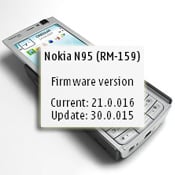
Nokia N95 Classic v30.0.015 Firmware out !!
A new software update is available for the Nokia N95. From what we can tell, it’s a major update as it brings the firmware version from 21.0.016 to 30.0.015.
 As usual, the new update optimizes the device’s performance and improves the overall stability. Additionally, once the upgrade is completed the N95 has more software installed and some of the existing apps are updated. Here’s what’s changed:
- Nokia Maps 2.0 built-in
- Full N-Gage client
- Nokia Search 4.0 with Google plug-in
- Share online 3.0
- Enablers for Comes With Music
- Download! application updated (v 3.1.50)
- Upgrade to Music Player
- Update for Flash Lite 3
- New baseline for VoIP (with error corrections)
- Autorotate
- Added 5th theme
Tuesday, 29 July 2008
Skyfire accepting BETA requests for the Skyfire symbian OS based web browser.
This browser is going to be the next big thing ....throwing the likes of the S60 browser and opera mini out of the window !!
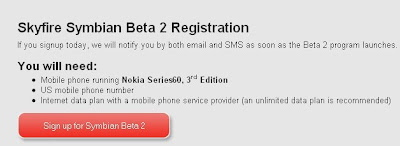
Previously the beta was only open for windows mobile users , but looks like now they've started developing a symbian OS version too. at the moment the beta is only open to U.S residents, but others can register too and will be informed as and when the browser is available for their region.
Head over to http://www.skyfire.com/sign-up to book your spot on the waiting list..!! :)

Previously the beta was only open for windows mobile users , but looks like now they've started developing a symbian OS version too. at the moment the beta is only open to U.S residents, but others can register too and will be informed as and when the browser is available for their region.
Head over to http://www.skyfire.com/sign-up to book your spot on the waiting list..!! :)
Samsungs 8 megapixel stunner !!
Samsung INNOV8 (Samsung i8510) takes mobile handset photography and multimedia experience to new heights with its 8 megapixel camera. It offers users top of the range camera technologies, a surround-sound cinematic video experience, the best mobile internet browsing experience and mobile gaming capabilities. The Samsung INNOV8 has the latest in imaging applications such as smile shot, blink shot and face recognition allowing memorable moments to be stored in their best quality. Users can also personalize and edit their photos, videos and music with Movie Maker and Story Board applications. The handset also acts as a digital photo frame, allowing users to display their favorite images. For the gamers, the Samsung INNOV8 comes pre-embedded with two of the world’s most famous games, Asphalt and FIFA 08. Additional features include an optical mouse and 4-way navigation key for enjoying PC-like browsing experience. And HSDPA high speed Internet and WiFi connection offer convenient and seamless internet experience wherever users are.
 Feature Overview
- 8 Megapixel camera
- 2.8” QVGA Display
- Optical mouse and 4-way navigation key
- A-GPS
- FM Radio with RDS
- HSDPA 7.2 Mbps (900/2100)
- EDGE / GPRS (850/900/1800/1900)
- Symbian OS V9.3, S60 3rd Edition Feature Pack 2
- Memory: 16GB Flash + External Memory slot : microSDHC™ (up to 16GB)
Thursday, 10 July 2008
Nokia Chat out at Nokia beta labs.
Finally Nokia releases their twitter-esque location based chat and messaging app. I've been waiting for such an app for so long ... and i'm really glad that Nokia has finally released it !!
From the beta labs website :


From the beta labs website :
Nokia Chat is more than just messaging. You can share your status and your location, giving you physical presence! Start a Nokia Chat with your friends with instant and voice messaging and finish it face-to-face. Get together with Nokia Chat – it’s where we are now.
- Meet one-to-one
- Update your status
- Share your location
- Message friends


Features
Chat helps you hook up with no hassles by sending your real-time location in an instant message. This unique feature lets your friend pinpoint your position and share her own on Nokia Maps.
Chance meetings with friends are made easy. Pick out your places on Nokia Maps and choose where you want to publish your presence. Chat automatically updates your location status when you arrive at your hangouts.
As well as sharing your location, you can edit your status with what’s going on and stay up-to-the-minute with your friends. Status symbols on Chat show when you’re available, on the phone, or away.
Chat puts quick and easy instant messaging at your fingertips. You can also record and send voice messages to friends.
Tested with:
Nokia N95 8GB, N95, N82, N81 8GB, N81, N76, E71, E66, E51, 6290, 6120 Classic, 6110 Navigator
Should work with:
Nokia E90 Communicator, 6124 classic, 6121 Classic, 5700 XpressMusic
To download this app , head over to : http://www.nokia.com/betalabs/chat
Remember , you have to install both the files in order for the app to work !!
Wednesday, 19 December 2007
emTube ..The best S60 youtube client yet !!
Forget about waiting for integrated .flv support...emTube has given us symbian users what we've all be waiting for so long . and the best part is ..its FREE !! You can head over to http://www.emtube.yoyo.pl/ and download the app. Also ...please remember to donate to the author if you find this app useful.

The interface is so smooth and uses the S60 PIPS library (the same libraries used by the quake port to S60) . The menus and navigation are like any typical s60 menu and thus need no getting used to. There even is a version which uses the N95's inbuilt accelerometer and the screen goes to landscape mode when you tilt the phone.

The volume control keys at the side work too...and it allows you to play the video even at the point where 75% buffering is complete . You can also directly download a video to your phone and view it at a later time.
There is an integrated search feature where you can search for videos just as you would do in youtube. You can also browse the most watched and recently added categories etc.

In all this is the killer app so many users were waiting for. Thank you Sebastian Jedruszkiewicz for giving us this wonderful app.

The interface is so smooth and uses the S60 PIPS library (the same libraries used by the quake port to S60) . The menus and navigation are like any typical s60 menu and thus need no getting used to. There even is a version which uses the N95's inbuilt accelerometer and the screen goes to landscape mode when you tilt the phone.

The volume control keys at the side work too...and it allows you to play the video even at the point where 75% buffering is complete . You can also directly download a video to your phone and view it at a later time.
There is an integrated search feature where you can search for videos just as you would do in youtube. You can also browse the most watched and recently added categories etc.

In all this is the killer app so many users were waiting for. Thank you Sebastian Jedruszkiewicz for giving us this wonderful app.
Tuesday, 17 July 2007
Hands on with Shozu v3.2
Shozu was one of those apps that was plagued with a lot of problems in the previous version . It used to hog memory , cause my N95 to crash and reboot randomly and i used to get the dreaded "memory full" error quicker than you can say jack sparrow !!

But now ..The shuzu team has released Version 3.20.. And its not just their logo that has changed !! Apart from adding a lot of more zucasts ...they have even added a lot more partners.You can now post your videos and photos to Youtube , Flickr , Kodak easy share , livejournal , wordpress , blogger ...and the list goes on. For all the people who are hearing about shozu for the first time ..you can head down to www.shozu.com and grab your free copy of the app.You have to sign up...and choose your phone model..and the link will be sms'd to you..or you can even grab it online. You can even schedule your zucast download time and download limit online ...so the zucasts you have subscribed to will be downloaded only during the time you have set it to.

But has the application really improved in performance and stability ?? I'd say yes !! With the previous version of shozu i had this problem where the gprs connection never terminated ,and i had to manually disconnect it from the connection manager. This issue seems to have been fixed with the new version.

Also ...There will always be a shozu process running in the background . I couldnt get the low down on how much memory this uses ...but judging from the fact that i dont get those memory full errors anymore...seems like the shozu team has done a pretty good job in keeping the memory usage low. EDIT : just found out that since i've installed shozu on my mem card ..and the process runs continously in the background ..I cannot connect my N95 in the mass storage device mode until and unless I kill the shozu app using some task manager app like swissknife utilities or ytasks :(

The standard features like Geo-tagging seem to be the same . The fact to be noted about the geo-tagging feature ..is that you should be locked on to the gps satellites for the geo tagging feature to work.So what i do is ..open the GPS data app in the background...let it lock on to the GPS satellites ..and then proceed to click photos.

There are a lot more zucasts too.Now you can subscribe to casts from buzznet , rocketboom and a lot more media providers.

The contact backup feature works as well as it did in the previous versions.Nothing new to report here....but its really good to have such a feature.Something that nokia has not been able to conjure up yet. I know we can backup our contacts to pc suite or lifeblog ..or even the memory card...but why cant nokia have a common online service for all its customers where they can safely store their contacts , pictures and videos ..upto a certain limit ??I'd rather wirelessly sync my contacts to an online service other than backing them up to my pc. I think this is one of the features that nokia should really look into before its too late and someone else steals the show.


In all I'd say the new shozu v3.2 app is a huge improvement over its previous version.Not only have the number of media channels increased ...but the interface is much quicker and memory issues have reduced considerably. It might not be the perfect app... but it looks like its heading in the right direction . This app has a lot of scope to be the next big thing in terms of media integration and push button publishing ..so i'm looking forward to a lot more improvements and features to be added to shozu over the next few months. As usual...Let me know what are your views on this app.It's always nice to have a good discussion going on . :o)

But now ..The shuzu team has released Version 3.20.. And its not just their logo that has changed !! Apart from adding a lot of more zucasts ...they have even added a lot more partners.You can now post your videos and photos to Youtube , Flickr , Kodak easy share , livejournal , wordpress , blogger ...and the list goes on. For all the people who are hearing about shozu for the first time ..you can head down to www.shozu.com and grab your free copy of the app.You have to sign up...and choose your phone model..and the link will be sms'd to you..or you can even grab it online. You can even schedule your zucast download time and download limit online ...so the zucasts you have subscribed to will be downloaded only during the time you have set it to.

But has the application really improved in performance and stability ?? I'd say yes !! With the previous version of shozu i had this problem where the gprs connection never terminated ,and i had to manually disconnect it from the connection manager. This issue seems to have been fixed with the new version.

Also ...There will always be a shozu process running in the background . I couldnt get the low down on how much memory this uses ...but judging from the fact that i dont get those memory full errors anymore...seems like the shozu team has done a pretty good job in keeping the memory usage low. EDIT : just found out that since i've installed shozu on my mem card ..and the process runs continously in the background ..I cannot connect my N95 in the mass storage device mode until and unless I kill the shozu app using some task manager app like swissknife utilities or ytasks :(

The standard features like Geo-tagging seem to be the same . The fact to be noted about the geo-tagging feature ..is that you should be locked on to the gps satellites for the geo tagging feature to work.So what i do is ..open the GPS data app in the background...let it lock on to the GPS satellites ..and then proceed to click photos.

There are a lot more zucasts too.Now you can subscribe to casts from buzznet , rocketboom and a lot more media providers.

The contact backup feature works as well as it did in the previous versions.Nothing new to report here....but its really good to have such a feature.Something that nokia has not been able to conjure up yet. I know we can backup our contacts to pc suite or lifeblog ..or even the memory card...but why cant nokia have a common online service for all its customers where they can safely store their contacts , pictures and videos ..upto a certain limit ??I'd rather wirelessly sync my contacts to an online service other than backing them up to my pc. I think this is one of the features that nokia should really look into before its too late and someone else steals the show.


In all I'd say the new shozu v3.2 app is a huge improvement over its previous version.Not only have the number of media channels increased ...but the interface is much quicker and memory issues have reduced considerably. It might not be the perfect app... but it looks like its heading in the right direction . This app has a lot of scope to be the next big thing in terms of media integration and push button publishing ..so i'm looking forward to a lot more improvements and features to be added to shozu over the next few months. As usual...Let me know what are your views on this app.It's always nice to have a good discussion going on . :o)
Thursday, 12 July 2007
Real Streaming Music , Videos Using ORB
One of the best services I've been using on my N95 is ORB. In fact ..this software service works on any phone that has the ability to play streaming media ... Be it real media streams (usually supported by symbian handsets) or wmv streams (usually supported by the windows mobile range).And best of all....Its Frigging FREE !!
Although you will need a broadband connection on your pc (or media server)and an unlimited (and fast enough) GPRS connection on your handset to make this work.
To use this awesome app ..you first have to download the orb installer from the website www.orb.com
Once you are through with the installation you can configure it as per your preferences. You can set the directories you have stored your respective media you want to stream or share.

If you have a router or are behind a firewall , do remember to unblock or port-forward the ports you are using for streaming real , 3gp or wmv streams.
After you have done this , you can head over to http://mycast.orb.com
This page will be your media interface to the web. All your shared media will be displayed here and you can decide if you want make your movies , mp3's public ..or just leave them as private so only you can access them. You can also add feeds from other sites such as youtube and dailymotion etc.
To access your media from your smartphone you have to key in the same url http://mycast.orb.com from your phone's browser. Once you log in...a much simplified and neater version of the mycast webpage will be displayed which is optimized for your device.

There are 8 menu tabs ... TV, AUDIO , VIDEO , PHOTO , DOCS , FILE , BROWSER ,and FEEDS.
Each one of them have their respective submenus and even the option to watch internet videos and listen to internet radio.

The File browser tab acts just like windows explorer and you can actually explore the entire contents of your hard disk.

Another great ability is to add feeds via the mycast webpage on your pc. You can then access those feeds via your phones browser. You can add feeds on the weather , your flickr photo stream ..or any other rss or atom feed you like.

One of the best things about the orb page is the ability to set your streaming bandwidth ..or there even is the option to let the app detect it for you. You can even remotely restart the orb application which is running on your pc.

Another cool feature is that it even gets the album art embedded in mp3 files and generates thumbnails for video files too. This is truly a couch potato's dream ...and i'm really enjoying the experience of listening to streaming music ..and watching my movie collection on my huge nokia N95 screen from the comfort of my bed.

This app is the closest you can get to real streaming on your N95 using your local router ..or through your GPRS connection.Do try it out and let me know what you think of it .
Aaaaaaaah....The good life !! :)
Although you will need a broadband connection on your pc (or media server)and an unlimited (and fast enough) GPRS connection on your handset to make this work.
To use this awesome app ..you first have to download the orb installer from the website www.orb.com
Once you are through with the installation you can configure it as per your preferences. You can set the directories you have stored your respective media you want to stream or share.

If you have a router or are behind a firewall , do remember to unblock or port-forward the ports you are using for streaming real , 3gp or wmv streams.
After you have done this , you can head over to http://mycast.orb.com
This page will be your media interface to the web. All your shared media will be displayed here and you can decide if you want make your movies , mp3's public ..or just leave them as private so only you can access them. You can also add feeds from other sites such as youtube and dailymotion etc.
To access your media from your smartphone you have to key in the same url http://mycast.orb.com from your phone's browser. Once you log in...a much simplified and neater version of the mycast webpage will be displayed which is optimized for your device.

There are 8 menu tabs ... TV, AUDIO , VIDEO , PHOTO , DOCS , FILE , BROWSER ,and FEEDS.
Each one of them have their respective submenus and even the option to watch internet videos and listen to internet radio.

The File browser tab acts just like windows explorer and you can actually explore the entire contents of your hard disk.

Another great ability is to add feeds via the mycast webpage on your pc. You can then access those feeds via your phones browser. You can add feeds on the weather , your flickr photo stream ..or any other rss or atom feed you like.

One of the best things about the orb page is the ability to set your streaming bandwidth ..or there even is the option to let the app detect it for you. You can even remotely restart the orb application which is running on your pc.

Another cool feature is that it even gets the album art embedded in mp3 files and generates thumbnails for video files too. This is truly a couch potato's dream ...and i'm really enjoying the experience of listening to streaming music ..and watching my movie collection on my huge nokia N95 screen from the comfort of my bed.

This app is the closest you can get to real streaming on your N95 using your local router ..or through your GPRS connection.Do try it out and let me know what you think of it .
Aaaaaaaah....The good life !! :)
Wednesday, 20 June 2007
Hands on with opera mini 4
Opera has released a new beta version of its latest incarnation of the opera mini browser ..also known as "dimension". For all those who'd like to check it out ...you can surf to mini.opera.com from your handset .. But how does this latest incarnation of the worlds most used mobile browser match up to the Nokia browser present in the Nseries devices ? Lets find out ...

For starters ...Installation was pretty smooth ..It detected my device and the download was over in a couple of seconds. The only problem i noticed ...And i dont know if its Particular to me..is that if you choose a wi-fi access point as the access point during the first run when opera tries to determine the internet connectivity...it just fails !! I tried it about 5-6 times ....and then ..i finally used my GPRS access point and it completed successfully. But the funny bit is ..thereafter..i used my Wi-fi point for surfing ... and it works great !!

Coming to the usability bit ....opera mini 4 feels much smoother than the older version and has a more nokia browser feel to it ...You have options of actually fitting the page to the width of the screen ..or showing the full page in a minimized fashion.The page downloading is smooth and quick. And the interface is pretty zippy.

How does this compare to the nokia browser in the n series devices ?? Well..my verdict would be ...The nokia browser is much better...!! But then ..thats not what opera mini is aiming at. They're aiming at a much greater audience and want their browser to be the staple web browser for every handset..not just nokia.And keep in mind ...this is just a beta ...So features like RSS feeds are still to be incorporated.Another great feature ..and this has been opera mini's major selling point ...unlike the nokia browser which downloads the original page and then customizes it to fit your display ...in the opera mini browser pages are already stripped of incompatible objects and are streamlined by opera servers before getting downloaded to your device...So You save a lot on GPRS costs if you have a limited or pay as you go data plan.
Opera definitely has a winner with this one !! Agreed that most nokia users (like me ) will still prefer the default nokia browser in the Nseries devices , but those with non symbian handsets and pay as you go data plans will really find opera mini 4 to be a godsend.It will be interesting to see how this new version of the worlds favourite mobile browser develops. But for now ...I guess i'll stick to my Nokia Web browser.

For starters ...Installation was pretty smooth ..It detected my device and the download was over in a couple of seconds. The only problem i noticed ...And i dont know if its Particular to me..is that if you choose a wi-fi access point as the access point during the first run when opera tries to determine the internet connectivity...it just fails !! I tried it about 5-6 times ....and then ..i finally used my GPRS access point and it completed successfully. But the funny bit is ..thereafter..i used my Wi-fi point for surfing ... and it works great !!

Coming to the usability bit ....opera mini 4 feels much smoother than the older version and has a more nokia browser feel to it ...You have options of actually fitting the page to the width of the screen ..or showing the full page in a minimized fashion.The page downloading is smooth and quick. And the interface is pretty zippy.

How does this compare to the nokia browser in the n series devices ?? Well..my verdict would be ...The nokia browser is much better...!! But then ..thats not what opera mini is aiming at. They're aiming at a much greater audience and want their browser to be the staple web browser for every handset..not just nokia.And keep in mind ...this is just a beta ...So features like RSS feeds are still to be incorporated.Another great feature ..and this has been opera mini's major selling point ...unlike the nokia browser which downloads the original page and then customizes it to fit your display ...in the opera mini browser pages are already stripped of incompatible objects and are streamlined by opera servers before getting downloaded to your device...So You save a lot on GPRS costs if you have a limited or pay as you go data plan.
Opera definitely has a winner with this one !! Agreed that most nokia users (like me ) will still prefer the default nokia browser in the Nseries devices , but those with non symbian handsets and pay as you go data plans will really find opera mini 4 to be a godsend.It will be interesting to see how this new version of the worlds favourite mobile browser develops. But for now ...I guess i'll stick to my Nokia Web browser.
Sunday, 27 May 2007
Geotagging photos on the N95 using LOCR
Remember how i always used to rant that the current apps available for Geo tagging on the N95 really suck. I mean ....there's shozu of course ...but its way too unstable ...and then there's zonetag... which hasn't come out with a symbian s60 v3 version yet.
But guess what ... all your N95 enthusiasts out there ..your prayers have finally been answered !! LOCR ...is a brand new FREE app which allows you to geotag your photos taken from your camera , on your camera ..or even on your p.c . There are several different flavors . There's the P.C edition ..which you can use to geotag photos on your p.c ..and then there's the symbian o.s versions ...which support symbian os v2.0 , v2.0 FP 1 and v3.0 . So that means you can use it even with an external bluetooth gps device . Cool...!!
All you have to do is first register on the Locr website . After doing that you can download the app from the download section . Install it on your device and you are all ready to go.

The best part is this app recognizes the inbuilt N95 gps module , and even when you arnt getting a GPS signal , it allows you to use your last known co-ordinates to tag the photo. Of course , you can edit it manually too. The photos can be uploaded to the Locr website via GPRS or Wi-fi and you can view them through your phone's web browser. Another cool feature is the ability to find photos near you...by using your current GPS co-ordinates. The only downside i've found in this app is the lack of third party support..i.e ability to upload your photo's on sites other than the locr website.Also the Max resolution supported is 1024 x 768 (0.8 mega pixels) :(

In all..this IS the best Photo geotagging app I've used on the N95 so far. Doesn't hog memory , doesn't crash and of course has all those excellent features which i mentioned before. I would recommend all you N95 users out there to give it a try ..and don't forget to let me know how it works out for you . :)
But guess what ... all your N95 enthusiasts out there ..your prayers have finally been answered !! LOCR ...is a brand new FREE app which allows you to geotag your photos taken from your camera , on your camera ..or even on your p.c . There are several different flavors . There's the P.C edition ..which you can use to geotag photos on your p.c ..and then there's the symbian o.s versions ...which support symbian os v2.0 , v2.0 FP 1 and v3.0 . So that means you can use it even with an external bluetooth gps device . Cool...!!
All you have to do is first register on the Locr website . After doing that you can download the app from the download section . Install it on your device and you are all ready to go.

The best part is this app recognizes the inbuilt N95 gps module , and even when you arnt getting a GPS signal , it allows you to use your last known co-ordinates to tag the photo. Of course , you can edit it manually too. The photos can be uploaded to the Locr website via GPRS or Wi-fi and you can view them through your phone's web browser. Another cool feature is the ability to find photos near you...by using your current GPS co-ordinates. The only downside i've found in this app is the lack of third party support..i.e ability to upload your photo's on sites other than the locr website.Also the Max resolution supported is 1024 x 768 (0.8 mega pixels) :(

In all..this IS the best Photo geotagging app I've used on the N95 so far. Doesn't hog memory , doesn't crash and of course has all those excellent features which i mentioned before. I would recommend all you N95 users out there to give it a try ..and don't forget to let me know how it works out for you . :)
Friday, 18 May 2007
Gizmo Project On The Nokia N95
Nokia Beta Labs has finally launched the much awaited Gizmo app for the Nokia N95. I for one was looking forward to this for a long time , as I previously tried the N80i version from the Gizmo website and it dint work, and I had a hard time uninstalling it.
This new version also supports GPRS ..but that would be mainly for communicating your status and chatting and not calls. For making calls you NEED a Wi-Fi connection and unlike Fring it is not possible to use this to make calls over your GPRS/3G connection.

The best thing about this is the excellent phonebook integration ..and an option of buying gizmo call out credit right from your cellphone.You can also set your status and also search for other users through the app.This app is pretty useless if you do not have Wi-Fi connectivity , or there are no Wi-Fi hotspots around , But if you do have either of these , and since the gizmo project is offering free VOIP calls to landlines and cell phones in selected countries... This is one app really worth trying.
Click here to download the Gizmo Project app for the Nokia N95
P.S : Both the components should be installed to the Phone memory only !!
This new version also supports GPRS ..but that would be mainly for communicating your status and chatting and not calls. For making calls you NEED a Wi-Fi connection and unlike Fring it is not possible to use this to make calls over your GPRS/3G connection.

The best thing about this is the excellent phonebook integration ..and an option of buying gizmo call out credit right from your cellphone.You can also set your status and also search for other users through the app.This app is pretty useless if you do not have Wi-Fi connectivity , or there are no Wi-Fi hotspots around , But if you do have either of these , and since the gizmo project is offering free VOIP calls to landlines and cell phones in selected countries... This is one app really worth trying.
Click here to download the Gizmo Project app for the Nokia N95
P.S : Both the components should be installed to the Phone memory only !!
N95 GPS Route Mapping.

Well..for starters ..i didn't think much of the GPS system.Heck..I didn't even think that it'd work in India !! But the most amazing part is that it does work ....and works superbly !! I used it to track a bike ride from kothrud to koregaon park (in pune )...and mind you ...the N95 was in my pocket all the time ..and yet the device performed extremely well and didn't even drop the signal once.The Nokia Sports Tracker which I used to record GPS data throughout my trip is free ware and can be downloaded here.
It works with all Symbian 0S V9 devices , but if you are using a phone without an inbuilt GPS , you will need to use an external bluetooth GPS module to capture GPS data. If you want to see what the Nokia Sports Tracker + the N95 GPS receiver is capable of ...check out some of my GPS Route Maps below : (I would suggest that you set the maps to the satellite mode for the best effect. :D)
PUNE
Paud Road to Koregaon Park
Koregaon Park to Pride Parmar Galaxy
Kalyani Nagar to Pride Parmar Galaxy
Sweet Chariot to Pride Parmar Galaxy
Part of the Pune-Goa Highway
GOA
Sarzora to Chinchinim
Sarzora to Margao
Margao to Furtados at sernabatim
Dabolim Airport to Margao
Twitter v/s Jaiku .. A Review
Oh well...categorically speaking ... this post shouldn't be here ..but what the heck.I'm impressed by the whole "social" blogging phenomenon thats sweeping the globe like wildfire ..so I decided to give these two hot contenders a try and post my opinions about them. The only reason i'm clubbing them under the mobile category is because they both have apps / ways by which you can access them via your mobile.
Twitter was one of the first in the social blogging scene and is still the favourite in some terms .Clean interface , very good API's , and of course ..a recently launched mobile version where you can access twitter from m.twitter.com from your cellphone.

Another great feature that twitter has is the ability to update your status from your phone via sms , and also from any instant messenger like gtalk . You also get your own personal page at http://www.twitter.com/yourname ..which you can share with your friends so they can know what you've been upto. If you have a GPS bluetooth device or a symbian phone like the N95 with a internal GPS , or any phone that supports Java Location API (JSR-179), then head over to www.twibble.de and install twibble. This app gets the current location coordinates and uploads it to your twitter account using GPRS , so that users using twittermaps.com can see where on the map you are right now. This is Real time location cum social blogging at its best . :D
Jaiku on the other hand has a web 2.0 look and feel to it. The whole interface is clean and tangy and really refreshing. As with twitter , jaiku also allows you to update your status and see what your friends are doing via your mobile , or sms.It goes one step further here and lets you download a sis file for symbian os smart phones and supports both symbian os 2nd and 3rd edition smart phones. Although the Jaiku app is still a beta version , it offers a lot of functionality which makes updating and viewing jaikus' from your smart phone a breeze.and believe me ... jaikuing from your cellphone is very very addictive :D !!The mobile app also lets you share your phones calendar and events as jaikus.. and you can even use bluetooth to scan for nearby jaiku'ers. How cool is that ?? Jaiku also gives you your own personal page at http://username.jaiku.com .

The most interesting feature about Jaiku that makes it (in my opinion) better than twitter is the fact that you can embed any rss , atom , swf , feed into your jaiku stream. They will show up as jaikus as and when the feeds are updated. this is really cool as i can integrate all my flickr , vox , blog , and even twitter accounts into one jaiku stream . In short ..it sort of doubles up as an RSS aggregator too letting people who visit your jaiku page know when you have updated any of the various online services or sites that you use. Another cool feature is the integration of channels in jaiku which makes it easy for you to subscribe to channels that interest you.This is somewhat similar to the IRC concept , where you can join a room and subscribe to the updates or interact on that channel.
Even though Twitter is the one site that should be given the most credit for making the whole social blogging scene come alive , it seems to have forgotten to innovate and add new features , and thats where jaiku marching ahead.Although twitters api's have been used for very innovative services such as www.twittermaps.com..which uses the co-ordinates provied by the twibble app to place you an a map , and www.twittervision.com ..which uses flickrs api and the geotags in the photos to display where those photos were clicked on a map as and when they are uploaded.But in spite of these two innovative features , what most people want today is convergence , and not another site that adds to the bookmark list , and in this respect jaiku is clearly doing a good job at it.
..And for those who want to integrate both these services ... You can try www.twitku.com , which uses jaikus api to post your twitters to your jaiku account. (although ...this can also be done from within jaiku itself). Go ahead and try out both these services and let me know what are your opinions about both of them. Any suggestions or comments are highly welcome :D
Twitter was one of the first in the social blogging scene and is still the favourite in some terms .Clean interface , very good API's , and of course ..a recently launched mobile version where you can access twitter from m.twitter.com from your cellphone.

Another great feature that twitter has is the ability to update your status from your phone via sms , and also from any instant messenger like gtalk . You also get your own personal page at http://www.twitter.com/yourname ..which you can share with your friends so they can know what you've been upto. If you have a GPS bluetooth device or a symbian phone like the N95 with a internal GPS , or any phone that supports Java Location API (JSR-179), then head over to www.twibble.de and install twibble. This app gets the current location coordinates and uploads it to your twitter account using GPRS , so that users using twittermaps.com can see where on the map you are right now. This is Real time location cum social blogging at its best . :D
Jaiku on the other hand has a web 2.0 look and feel to it. The whole interface is clean and tangy and really refreshing. As with twitter , jaiku also allows you to update your status and see what your friends are doing via your mobile , or sms.It goes one step further here and lets you download a sis file for symbian os smart phones and supports both symbian os 2nd and 3rd edition smart phones. Although the Jaiku app is still a beta version , it offers a lot of functionality which makes updating and viewing jaikus' from your smart phone a breeze.and believe me ... jaikuing from your cellphone is very very addictive :D !!The mobile app also lets you share your phones calendar and events as jaikus.. and you can even use bluetooth to scan for nearby jaiku'ers. How cool is that ?? Jaiku also gives you your own personal page at http://username.jaiku.com .

The most interesting feature about Jaiku that makes it (in my opinion) better than twitter is the fact that you can embed any rss , atom , swf , feed into your jaiku stream. They will show up as jaikus as and when the feeds are updated. this is really cool as i can integrate all my flickr , vox , blog , and even twitter accounts into one jaiku stream . In short ..it sort of doubles up as an RSS aggregator too letting people who visit your jaiku page know when you have updated any of the various online services or sites that you use. Another cool feature is the integration of channels in jaiku which makes it easy for you to subscribe to channels that interest you.This is somewhat similar to the IRC concept , where you can join a room and subscribe to the updates or interact on that channel.
Even though Twitter is the one site that should be given the most credit for making the whole social blogging scene come alive , it seems to have forgotten to innovate and add new features , and thats where jaiku marching ahead.Although twitters api's have been used for very innovative services such as www.twittermaps.com..which uses the co-ordinates provied by the twibble app to place you an a map , and www.twittervision.com ..which uses flickrs api and the geotags in the photos to display where those photos were clicked on a map as and when they are uploaded.But in spite of these two innovative features , what most people want today is convergence , and not another site that adds to the bookmark list , and in this respect jaiku is clearly doing a good job at it.
..And for those who want to integrate both these services ... You can try www.twitku.com , which uses jaikus api to post your twitters to your jaiku account. (although ...this can also be done from within jaiku itself). Go ahead and try out both these services and let me know what are your opinions about both of them. Any suggestions or comments are highly welcome :D
Subscribe to:
Posts (Atom)