Looks like the hackers arn't giving up so easily yet !! The new hack from Deltafox over at symbian freak lets you unlock your nopkia phone from the shackles of symbian signing .
The hack has been confirmed to work on the following phones/firmware.
Nokia N82 firmware version 30.0.019 and 31.0.016
Nokia N95 firmware version 31.0.017
Nokia N95 8GB firmware version 31.0.015
Nokia E90 Communicator version 300.34.84
Nokia E71 firmware versions 110.07.127 and 200.21.188
The procedure :
1. Check if you can hack your phone with the HelloCarbide and ROMPatcher method. If you can, use that method instead. Only use the method below if nothing else works.
2. Get a developer certificate. Be patient, it can take a while before your certificate is ready.
3. Download this package from Mobile Castle.
4. BACK UP YOUR PHONE MEMORY! On some phones you'll need to click "Memory" in the settings folder, on other phones you can back up your phone memory from the options menu in the file manager. You can also back up your phone memory with PC Suite.
5. Sign MapDrives (which you downloaded in step 3) with the certificate you got in step 2, and install the signed copy of MapDrives on your phone.
6. Copy MapDrives.txt to your memory card (E:\), so you'll get E:\MapDrives.txt.
7. Install JBak TaskMan, start it, press the # key, highlight the MapDrives entry, click "options," "program rules," and select "autostart."
8. Restart your phone.
9. Delete MapDrives and install MapDrive_JBakTM_EMU_Y (for N82, N95, N95-8GB, and other phones that have a drive called Y:\), and start it.
10. Install Modo, and use the Modo file manager to copy installserver.exe to C:\sys\bin.
11. Once the modified installserver.exe is copied to C:\sys\bin you don't need MapDrives and JBak anymore, but you still need Modo to write to C:\sys.
Note: with this hack you can not write to C:\sys and other system folders with file managers like X-plore or ActiveFile. You can read C:\sys\bin with these file managers, but you can only write to C:\sys\bin with Modo.
Confirmed to work on these phones and firmware versions:
Nokia N82 firmware version 30.0.019 and 31.0.016
Nokia N95 firmware version 31.0.017
Nokia N95 8GB firmware version 31.0.015
Nokia E90 Communicator version 300.34.84
Nokia E71 firmware versions 110.07.127 and 200.21.188
For more information , head over here :
Symbian Freak (login required)
Symbian Underground

Showing posts with label N95. Show all posts
Showing posts with label N95. Show all posts
Wednesday, 28 January 2009

Thursday, 8 January 2009
Nokia N95-1 minor firmware update v31.0.017

The N95 classic has got some more love from nokia (probably for the last time) . This is a minor firmware update (the previous one being v31.0.015) and people who have upgraded have reported that like the previous update , this one too renders your phone unhackable. Users report that the update fixes the following bugs found in the previous version of the firmware:
- Icon animation fixed
- Language Bug Fixed
- Bold Menu Fixed
As for me ...I'm sticking to my v30 hackable firmware for now. :)
Tuesday, 16 December 2008
Nokia N95 classic firmware - v31.0.014 out !!

Perhaps for the final time, Nokia has rolled out a new firmware for the Nokia N95 - v31.0.014. The new firmware apparently just brings bug fixes and perhaps an end to the ‘platform hack’. Since the phone doesn’t support UDP (User Data Preservation) make sure you back up the device before you update via the NSU. If you are keen on hacking, hang on to v30 as this firmware has nothing special to offer, no transitions N81 style and so on.
Via: AAS
Tuesday, 9 September 2008
Nokia N95 Classic v30.0.015 Firmware out !!
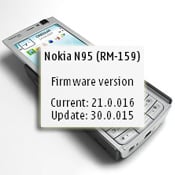
A new software update is available for the Nokia N95. From what we can tell, it’s a major update as it brings the firmware version from 21.0.016 to 30.0.015.
 As usual, the new update optimizes the device’s performance and improves the overall stability. Additionally, once the upgrade is completed the N95 has more software installed and some of the existing apps are updated. Here’s what’s changed:
- Nokia Maps 2.0 built-in
- Full N-Gage client
- Nokia Search 4.0 with Google plug-in
- Share online 3.0
- Enablers for Comes With Music
- Download! application updated (v 3.1.50)
- Upgrade to Music Player
- Update for Flash Lite 3
- New baseline for VoIP (with error corrections)
- Autorotate
- Added 5th theme
Thursday, 21 August 2008
Firemint Real Raching coming to the N95 !!
This looks so awesome !! And controlling the car by just the accelerometer is such a cool concept. I've been waiting for a game like this to hit the shelves for a long long time.. Some of the game specs include:
The most exciting HD racing experience on mobile
- Ultra realistic HD graphics
- Multi channel surround sound
- Realistic dynamics with natural accelerometer control
- Head to head multiplayer via WiFi or OTA
- Track your friends' performance using Real Racing's Facebook and OpenSocial applications
- Publish your best laps to YouTube with the press of a button
- Mash up and publish your results with web tools from Real Racing's user portal
Friday, 25 July 2008
Nokia E71 : Initial Observations !
The great people at Womworld sent me a Nokia E71 to trial. This device is everything you have read about it and much much more..!! I was seriously skeptical about how much praise was being heaped on this "E-Series-Posterboy" phone, but once you get your hands on this stunner ..trust me ....you wont feel like looking at any other e series phones ... ever ! I'm sure a lot of people are going to dump their blackberrys for this baby !
This is only the review of the physical features of the E71. I will be posting a detailed software review later.
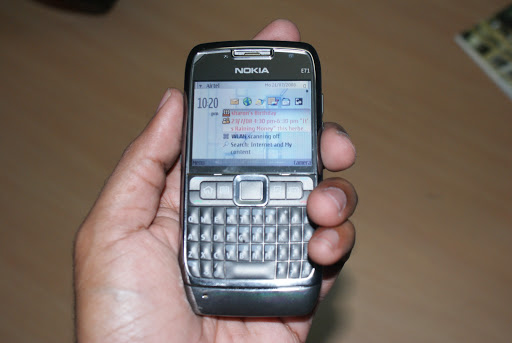
As you can see in the picture ... the E71 looks absolutely stunning , The amazing metallic finish feels good to look at and to hold too. Also as with the other newer E-series phones .The phone runs on symbian OS 9.2 and has the new "home" and "delete" keys .. and also features a "CTRL"(which i'm assuming is used to in VPN and Remote Admin functions) function on the dedicated "special characters" button.Also visible in the picture are the Dedicated calendar , phone book and messages button.Also hiding beneath somewhere is the GPS chip. this is the second E-series phone to get inbuilt GPS functionality after the E90. The GPS lock on is fast and takes under 10 seconds as compared to nearly a minute on my N95.The full qwerty keypad is amazing ! it might look minuscule here ... but the buttons are so well contoured that even a guy like me with big fingers can easily use the keypad without pressing two keys at once. Also the combination of predictive text + auto correction + qwerty keypad makes typing out even the lengthiest emails on this device a real breeze.
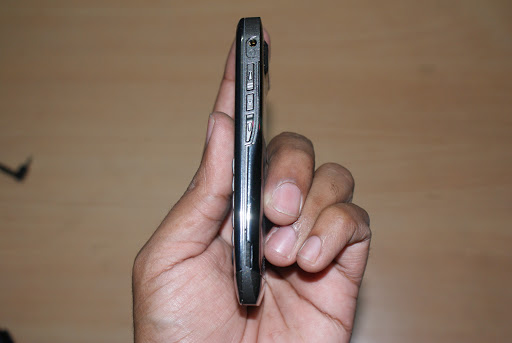
The side view of the E71 , in all its stunning glory.The only disappointment here was 2.5 mm headphone jack in lieu of the standard 3.5mm one , but i guess it had to be done due to space constraints. So this means you cant use your normal mp3 player headphones like you can in the N95 and certain other N series phones. There button with the dot in the center is used to mute calls.
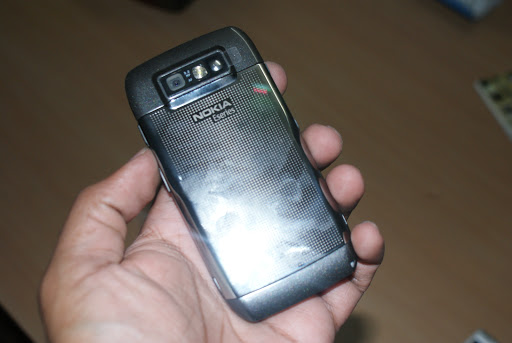
The back casing of the E71 has a nice feel to it. All the squares you can see are actually carved into the metallic cover , which ensures that this sleek phone does not slip out of your hand under any conditions.Also provided is a 3.2 megapixel camera with auto focus & geo tagging , and a LED flash.The E71 also does away with the front camera found in most N series phones. The camera quality is fairly acceptable for an E-series phone , and cannot be compared to the likes of the N73 or the N95 for that matter. Still , I wish the camera was a little better .
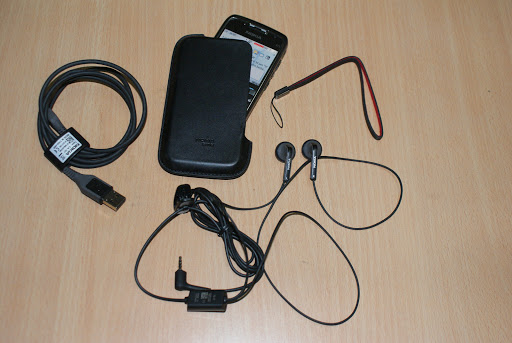
These are some of the accessories that come with the E71 box. A nice red and black lanyard and Case. The case is of really good quality and has a nice red interior and looks very very classy (a nice addition to those Armani suits :P ) . Also included are a 2.5mm headset and the usb data cable (unlike Motorola and Samsung ...you cannot charge the phone with this) and a travel charger.
Comparisons with the Nokia N95 : (physical features)
The E71 is THIN !! Just comparing it with my N95 was like comparing the size of a mac book air to a Panasonic toughbook !!
And I dunno how nokia engineers managed to squeeze a full qwerty keypad in there ...but I must say ..its real impressive to see the amount of stuff they've crammed into this device !
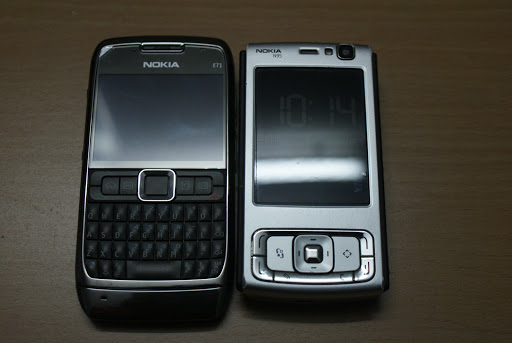
The E71 as you can see is only slightly longer than the N95 in the closed state.
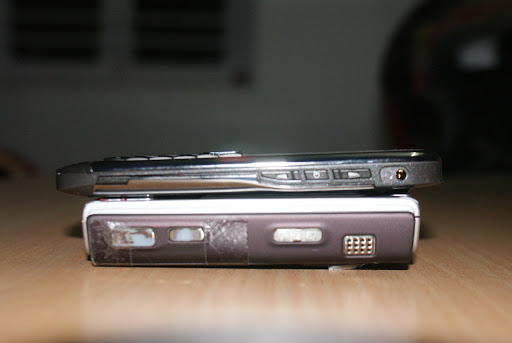
In terms of thickness ... There is no comparison at all !! The E71 is wafer thin as compared to the N95 .. which is really good for all those business suits out there ...so you don't have an awkward bulge sticking out of your trouser/suit pockets !

This concludes my review of the physical features of the E71. I will be posting a detailed software review of the device and its features later. Do let me know if you have any questions about the device and i will try to answer them in my next post. :)
This is only the review of the physical features of the E71. I will be posting a detailed software review later.
As you can see in the picture ... the E71 looks absolutely stunning , The amazing metallic finish feels good to look at and to hold too. Also as with the other newer E-series phones .The phone runs on symbian OS 9.2 and has the new "home" and "delete" keys .. and also features a "CTRL"(which i'm assuming is used to in VPN and Remote Admin functions) function on the dedicated "special characters" button.Also visible in the picture are the Dedicated calendar , phone book and messages button.Also hiding beneath somewhere is the GPS chip. this is the second E-series phone to get inbuilt GPS functionality after the E90. The GPS lock on is fast and takes under 10 seconds as compared to nearly a minute on my N95.The full qwerty keypad is amazing ! it might look minuscule here ... but the buttons are so well contoured that even a guy like me with big fingers can easily use the keypad without pressing two keys at once. Also the combination of predictive text + auto correction + qwerty keypad makes typing out even the lengthiest emails on this device a real breeze.
The side view of the E71 , in all its stunning glory.The only disappointment here was 2.5 mm headphone jack in lieu of the standard 3.5mm one , but i guess it had to be done due to space constraints. So this means you cant use your normal mp3 player headphones like you can in the N95 and certain other N series phones. There button with the dot in the center is used to mute calls.
The back casing of the E71 has a nice feel to it. All the squares you can see are actually carved into the metallic cover , which ensures that this sleek phone does not slip out of your hand under any conditions.Also provided is a 3.2 megapixel camera with auto focus & geo tagging , and a LED flash.
These are some of the accessories that come with the E71 box. A nice red and black lanyard and Case. The case is of really good quality and has a nice red interior and looks very very classy (a nice addition to those Armani suits :P ) . Also included are a 2.5mm headset and the usb data cable (unlike Motorola and Samsung ...you cannot charge the phone with this) and a travel charger.
Comparisons with the Nokia N95 : (physical features)
The E71 is THIN !! Just comparing it with my N95 was like comparing the size of a mac book air to a Panasonic toughbook !!
And I dunno how nokia engineers managed to squeeze a full qwerty keypad in there ...but I must say ..its real impressive to see the amount of stuff they've crammed into this device !
The E71 as you can see is only slightly longer than the N95 in the closed state.
In terms of thickness ... There is no comparison at all !! The E71 is wafer thin as compared to the N95 .. which is really good for all those business suits out there ...so you don't have an awkward bulge sticking out of your trouser/suit pockets !

This concludes my review of the physical features of the E71. I will be posting a detailed software review of the device and its features later. Do let me know if you have any questions about the device and i will try to answer them in my next post. :)
Saturday, 29 March 2008
N95 v/s N82 Night shots !!
The great guys at WOMWORLD had sent me a N82 to review a few weeks back. I wanted to post this article sooner , but I was really busy for the past few days. I tested out how the N95 fared compared to the N82 xenon flash. The photos were all clicked in pitch darkness just because I wanted to compare the effect of the xenon flash compared to the LED equipped N95.The result ? The N82 wins by miles. Simply no competition here. Although the N95 did manage to shoot some decent pics when the subject was in focus . Else ...its the N82 all the way !! If you're the type of person who parties a lot ..or clicks a lot of snaps in really dark places...then the N82 is definitely the phone for you !!
Check out the comparison photos here :
http://www.flickr.com/photos/fotojunkie/sets/72157604318666969/
Lemme know what you think.
Check out the comparison photos here :
http://www.flickr.com/photos/fotojunkie/sets/72157604318666969/
Lemme know what you think.
Wednesday, 26 March 2008


Friday, 14 March 2008
Nokia N95-1 firmware v21.0.016 changelog out !! Actual firmware not out yet !!
The Symbian World blog has reported that the changelog for the Nokia N95-1 v21.0.016 "yet to be released" firmware is already out. This is strange considering the changelog usually only appears about a few days after the firmware is out. This also means that we can expect the firmware to be released in the next few days. I'm particularly happy about the youtube support and the inclusion of web runtime widgets. Now its time to keep a watch for the firmware on NSU. :)
Here's the changelog :
New features
* Flash Lite 3 support added
* Widget (Web runtime) support added
* Default year changed to 2008
Improvements
* General stability improvements.
* Pre-defined access point kept after switching to different type SIM card.
* Localization improvements.
* Standby time improvements.
* Improvements to BT headset interoperability.
* Improvement to Calendar data restoring.
* Switch from landscape to portrait mode & screen rotations improvements.
Browser
* Improvement to long text writing to web page text boxes.
* Browsing from WLAN wizard improvement.
Media Player
* Localizations improvements in Music player.
* Windows Media Player recognizes device as Nokia N95.
Gallery
* Image rotation improvement in album view.
* Gallery & Slideshow performance improvements.
Messaging
* Improvement to SMS reception.
Java
* Midlet installation improvement.
* Improvement to Java application start.
* Java midlet certificate checking improvement.
Navigation
* General improvements to Maps application.
* Localization correction to Search in Maps application.
* Improvement to Navigate To -function when started from search application.
SIM
* Contact names with accents and more than 11 characters can be copied to SIM card.
Here's the changelog :
New features
* Flash Lite 3 support added
* Widget (Web runtime) support added
* Default year changed to 2008
Improvements
* General stability improvements.
* Pre-defined access point kept after switching to different type SIM card.
* Localization improvements.
* Standby time improvements.
* Improvements to BT headset interoperability.
* Improvement to Calendar data restoring.
* Switch from landscape to portrait mode & screen rotations improvements.
Browser
* Improvement to long text writing to web page text boxes.
* Browsing from WLAN wizard improvement.
Media Player
* Localizations improvements in Music player.
* Windows Media Player recognizes device as Nokia N95.
Gallery
* Image rotation improvement in album view.
* Gallery & Slideshow performance improvements.
Messaging
* Improvement to SMS reception.
Java
* Midlet installation improvement.
* Improvement to Java application start.
* Java midlet certificate checking improvement.
Navigation
* General improvements to Maps application.
* Localization correction to Search in Maps application.
* Improvement to Navigate To -function when started from search application.
SIM
* Contact names with accents and more than 11 characters can be copied to SIM card.
Friday, 25 January 2008
Nokia Share Online v3.0 Beta updated !!
The Nokia Share online v3.0 beta has been updated to support Nokia N95 / N82, Nokia N76 / N81 and the Nokia N73.

This is an important update as when i used the previous v3 beta on my v20 firmware N95 ..it just gave me an upgrade error. Hopefully this version has fixed all those quirks. I wouldn't really say this is a great app... as I use shozu and it does all this app can do + much more. But still..if you are a fan of nokia apps....then don't miss out on this one. To download this app..head over to :
http://www.nokia.com/betalabs/shareonline

This is an important update as when i used the previous v3 beta on my v20 firmware N95 ..it just gave me an upgrade error. Hopefully this version has fixed all those quirks. I wouldn't really say this is a great app... as I use shozu and it does all this app can do + much more. But still..if you are a fan of nokia apps....then don't miss out on this one. To download this app..head over to :
http://www.nokia.com/betalabs/shareonline
Tuesday, 22 January 2008
NiiMe Lets you use your N95 as a PC Gamepad
A video which shows The N95 being used as a PC game controller has surfaced on youtube. The Operation is similar to that of Nokmote ..except here you can use the N95 as a bluetooth enabled Game Controller. Looks pretty cool ...And I'm really looking forward to the release.
EDIT : The download Link : http://niime.com/download.htm
EDIT : The download Link : http://niime.com/download.htm
Wednesday, 19 December 2007
emTube ..The best S60 youtube client yet !!
Forget about waiting for integrated .flv support...emTube has given us symbian users what we've all be waiting for so long . and the best part is ..its FREE !! You can head over to http://www.emtube.yoyo.pl/ and download the app. Also ...please remember to donate to the author if you find this app useful.

The interface is so smooth and uses the S60 PIPS library (the same libraries used by the quake port to S60) . The menus and navigation are like any typical s60 menu and thus need no getting used to. There even is a version which uses the N95's inbuilt accelerometer and the screen goes to landscape mode when you tilt the phone.

The volume control keys at the side work too...and it allows you to play the video even at the point where 75% buffering is complete . You can also directly download a video to your phone and view it at a later time.
There is an integrated search feature where you can search for videos just as you would do in youtube. You can also browse the most watched and recently added categories etc.

In all this is the killer app so many users were waiting for. Thank you Sebastian Jedruszkiewicz for giving us this wonderful app.

The interface is so smooth and uses the S60 PIPS library (the same libraries used by the quake port to S60) . The menus and navigation are like any typical s60 menu and thus need no getting used to. There even is a version which uses the N95's inbuilt accelerometer and the screen goes to landscape mode when you tilt the phone.

The volume control keys at the side work too...and it allows you to play the video even at the point where 75% buffering is complete . You can also directly download a video to your phone and view it at a later time.
There is an integrated search feature where you can search for videos just as you would do in youtube. You can also browse the most watched and recently added categories etc.

In all this is the killer app so many users were waiting for. Thank you Sebastian Jedruszkiewicz for giving us this wonderful app.
Tuesday, 27 November 2007
Nokia N95-1 Firmware update v20.0.015 out !!
Nokia N95 Software version 20.0.015 released - 26 November 2007
This software version includes battery, stability & performance improvements enabling you to run faster and longer - giving you up to three more hours of music (up to 30% increase, from 9h to 12h of music playback). This release also includes a new version of Nokia Maps which provides faster positioning, faster Map Loader, and free 3-day navigation. Free N-Gage demo games are included and other games are available via Download! With the Nokia Music Store now live in the United Kingdom, users can enjoy the convenience of instant over-the-air downloads, regardless of where they are.
After updating your device software to 20.0.015, and restoring your personal data, you can optimise the menu layout by installing the New_Menu_Structure.SIS file. Download and install this file to rearrange your menu layout specifically for SW 20.0.015. Reboot your device to see the menu changes.
Grab it while its hot !!
http://europe.nokia.com/A4577225
Wednesday, 21 November 2007
Nokia Sports Tracker Updated to v1.62
Nokia has finally launched a web interface for its sports tracker app and has also updated the app to v1.62. The new updated application lets you upload your workouts and trips directly to the nokia sportstracker website where you can share them with other users ...much like the nike shoes+ ipod kit thats selling out there .

To download the updated app...head over to http://sportstracker.nokia.com and register yourself on the site. Then you will be able to download the application and upload your stats. You can even do this by downloading the updated app and then registering from the phone itself.

Go ahead and share !! :)

To download the updated app...head over to http://sportstracker.nokia.com and register yourself on the site. Then you will be able to download the application and upload your stats. You can even do this by downloading the updated app and then registering from the phone itself.

Go ahead and share !! :)
Nokia N95 Classic firmware v21 on its way...
Stumbled across this video of a symbian freak.com member demoing the yet to be released Nokia N95 classic firmware v21 (yes..thats a big leap from v12) via remote device access.As expected ...Nokia has implemented the demand paging feature and as you can see in the video ..there's still plenty of ram available even after opening 5-6 applications. There's also the inclusion of the search tool in the active standby screen and the new n-gage platform software. The inclusion of demand paging would also mean that you can squeeze more life out of your battery.I just cant wait to get my hands on this update !!
Thursday, 1 November 2007
N95 Accelerometer in action...
Soon after the news of the new rotate me application that uses the built in level sensor...
This is awesome. I searched for videos of this on the net and couldnt find any ..so i had to post one of my own. I wonder why nokia has not developed any applications that use this yet ? It would unleash the true potential of the N95.For those of you interested in Downloading the app..you can find it here :
http://research.nokia.com/projects/activity_monitor
1.Install the N95 RD Accelerometer Plug-in package (there is a sis file inside the .zip file...thats all you need)
2.Install the MovingBall_Example.sisx to your phone.
3.Enjoy killing time with this awesome app !! :)
Expect to see more apps using this awesome functionality to be released soon...
This is sooooooo coool !!
This is awesome. I searched for videos of this on the net and couldnt find any ..so i had to post one of my own. I wonder why nokia has not developed any applications that use this yet ? It would unleash the true potential of the N95.For those of you interested in Downloading the app..you can find it here :
http://research.nokia.com/projects/activity_monitor
1.Install the N95 RD Accelerometer Plug-in package (there is a sis file inside the .zip file...thats all you need)
2.Install the MovingBall_Example.sisx to your phone.
3.Enjoy killing time with this awesome app !! :)
Expect to see more apps using this awesome functionality to be released soon...
This is sooooooo coool !!
Saturday, 15 September 2007

Tuesday, 17 July 2007
Hands on with Shozu v3.2
Shozu was one of those apps that was plagued with a lot of problems in the previous version . It used to hog memory , cause my N95 to crash and reboot randomly and i used to get the dreaded "memory full" error quicker than you can say jack sparrow !!

But now ..The shuzu team has released Version 3.20.. And its not just their logo that has changed !! Apart from adding a lot of more zucasts ...they have even added a lot more partners.You can now post your videos and photos to Youtube , Flickr , Kodak easy share , livejournal , wordpress , blogger ...and the list goes on. For all the people who are hearing about shozu for the first time ..you can head down to www.shozu.com and grab your free copy of the app.You have to sign up...and choose your phone model..and the link will be sms'd to you..or you can even grab it online. You can even schedule your zucast download time and download limit online ...so the zucasts you have subscribed to will be downloaded only during the time you have set it to.

But has the application really improved in performance and stability ?? I'd say yes !! With the previous version of shozu i had this problem where the gprs connection never terminated ,and i had to manually disconnect it from the connection manager. This issue seems to have been fixed with the new version.

Also ...There will always be a shozu process running in the background . I couldnt get the low down on how much memory this uses ...but judging from the fact that i dont get those memory full errors anymore...seems like the shozu team has done a pretty good job in keeping the memory usage low. EDIT : just found out that since i've installed shozu on my mem card ..and the process runs continously in the background ..I cannot connect my N95 in the mass storage device mode until and unless I kill the shozu app using some task manager app like swissknife utilities or ytasks :(

The standard features like Geo-tagging seem to be the same . The fact to be noted about the geo-tagging feature ..is that you should be locked on to the gps satellites for the geo tagging feature to work.So what i do is ..open the GPS data app in the background...let it lock on to the GPS satellites ..and then proceed to click photos.

There are a lot more zucasts too.Now you can subscribe to casts from buzznet , rocketboom and a lot more media providers.

The contact backup feature works as well as it did in the previous versions.Nothing new to report here....but its really good to have such a feature.Something that nokia has not been able to conjure up yet. I know we can backup our contacts to pc suite or lifeblog ..or even the memory card...but why cant nokia have a common online service for all its customers where they can safely store their contacts , pictures and videos ..upto a certain limit ??I'd rather wirelessly sync my contacts to an online service other than backing them up to my pc. I think this is one of the features that nokia should really look into before its too late and someone else steals the show.


In all I'd say the new shozu v3.2 app is a huge improvement over its previous version.Not only have the number of media channels increased ...but the interface is much quicker and memory issues have reduced considerably. It might not be the perfect app... but it looks like its heading in the right direction . This app has a lot of scope to be the next big thing in terms of media integration and push button publishing ..so i'm looking forward to a lot more improvements and features to be added to shozu over the next few months. As usual...Let me know what are your views on this app.It's always nice to have a good discussion going on . :o)

But now ..The shuzu team has released Version 3.20.. And its not just their logo that has changed !! Apart from adding a lot of more zucasts ...they have even added a lot more partners.You can now post your videos and photos to Youtube , Flickr , Kodak easy share , livejournal , wordpress , blogger ...and the list goes on. For all the people who are hearing about shozu for the first time ..you can head down to www.shozu.com and grab your free copy of the app.You have to sign up...and choose your phone model..and the link will be sms'd to you..or you can even grab it online. You can even schedule your zucast download time and download limit online ...so the zucasts you have subscribed to will be downloaded only during the time you have set it to.

But has the application really improved in performance and stability ?? I'd say yes !! With the previous version of shozu i had this problem where the gprs connection never terminated ,and i had to manually disconnect it from the connection manager. This issue seems to have been fixed with the new version.

Also ...There will always be a shozu process running in the background . I couldnt get the low down on how much memory this uses ...but judging from the fact that i dont get those memory full errors anymore...seems like the shozu team has done a pretty good job in keeping the memory usage low. EDIT : just found out that since i've installed shozu on my mem card ..and the process runs continously in the background ..I cannot connect my N95 in the mass storage device mode until and unless I kill the shozu app using some task manager app like swissknife utilities or ytasks :(

The standard features like Geo-tagging seem to be the same . The fact to be noted about the geo-tagging feature ..is that you should be locked on to the gps satellites for the geo tagging feature to work.So what i do is ..open the GPS data app in the background...let it lock on to the GPS satellites ..and then proceed to click photos.

There are a lot more zucasts too.Now you can subscribe to casts from buzznet , rocketboom and a lot more media providers.

The contact backup feature works as well as it did in the previous versions.Nothing new to report here....but its really good to have such a feature.Something that nokia has not been able to conjure up yet. I know we can backup our contacts to pc suite or lifeblog ..or even the memory card...but why cant nokia have a common online service for all its customers where they can safely store their contacts , pictures and videos ..upto a certain limit ??I'd rather wirelessly sync my contacts to an online service other than backing them up to my pc. I think this is one of the features that nokia should really look into before its too late and someone else steals the show.


In all I'd say the new shozu v3.2 app is a huge improvement over its previous version.Not only have the number of media channels increased ...but the interface is much quicker and memory issues have reduced considerably. It might not be the perfect app... but it looks like its heading in the right direction . This app has a lot of scope to be the next big thing in terms of media integration and push button publishing ..so i'm looking forward to a lot more improvements and features to be added to shozu over the next few months. As usual...Let me know what are your views on this app.It's always nice to have a good discussion going on . :o)
Thursday, 12 July 2007
Real Streaming Music , Videos Using ORB
One of the best services I've been using on my N95 is ORB. In fact ..this software service works on any phone that has the ability to play streaming media ... Be it real media streams (usually supported by symbian handsets) or wmv streams (usually supported by the windows mobile range).And best of all....Its Frigging FREE !!
Although you will need a broadband connection on your pc (or media server)and an unlimited (and fast enough) GPRS connection on your handset to make this work.
To use this awesome app ..you first have to download the orb installer from the website www.orb.com
Once you are through with the installation you can configure it as per your preferences. You can set the directories you have stored your respective media you want to stream or share.

If you have a router or are behind a firewall , do remember to unblock or port-forward the ports you are using for streaming real , 3gp or wmv streams.
After you have done this , you can head over to http://mycast.orb.com
This page will be your media interface to the web. All your shared media will be displayed here and you can decide if you want make your movies , mp3's public ..or just leave them as private so only you can access them. You can also add feeds from other sites such as youtube and dailymotion etc.
To access your media from your smartphone you have to key in the same url http://mycast.orb.com from your phone's browser. Once you log in...a much simplified and neater version of the mycast webpage will be displayed which is optimized for your device.

There are 8 menu tabs ... TV, AUDIO , VIDEO , PHOTO , DOCS , FILE , BROWSER ,and FEEDS.
Each one of them have their respective submenus and even the option to watch internet videos and listen to internet radio.

The File browser tab acts just like windows explorer and you can actually explore the entire contents of your hard disk.

Another great ability is to add feeds via the mycast webpage on your pc. You can then access those feeds via your phones browser. You can add feeds on the weather , your flickr photo stream ..or any other rss or atom feed you like.

One of the best things about the orb page is the ability to set your streaming bandwidth ..or there even is the option to let the app detect it for you. You can even remotely restart the orb application which is running on your pc.

Another cool feature is that it even gets the album art embedded in mp3 files and generates thumbnails for video files too. This is truly a couch potato's dream ...and i'm really enjoying the experience of listening to streaming music ..and watching my movie collection on my huge nokia N95 screen from the comfort of my bed.

This app is the closest you can get to real streaming on your N95 using your local router ..or through your GPRS connection.Do try it out and let me know what you think of it .
Aaaaaaaah....The good life !! :)
Although you will need a broadband connection on your pc (or media server)and an unlimited (and fast enough) GPRS connection on your handset to make this work.
To use this awesome app ..you first have to download the orb installer from the website www.orb.com
Once you are through with the installation you can configure it as per your preferences. You can set the directories you have stored your respective media you want to stream or share.

If you have a router or are behind a firewall , do remember to unblock or port-forward the ports you are using for streaming real , 3gp or wmv streams.
After you have done this , you can head over to http://mycast.orb.com
This page will be your media interface to the web. All your shared media will be displayed here and you can decide if you want make your movies , mp3's public ..or just leave them as private so only you can access them. You can also add feeds from other sites such as youtube and dailymotion etc.
To access your media from your smartphone you have to key in the same url http://mycast.orb.com from your phone's browser. Once you log in...a much simplified and neater version of the mycast webpage will be displayed which is optimized for your device.

There are 8 menu tabs ... TV, AUDIO , VIDEO , PHOTO , DOCS , FILE , BROWSER ,and FEEDS.
Each one of them have their respective submenus and even the option to watch internet videos and listen to internet radio.

The File browser tab acts just like windows explorer and you can actually explore the entire contents of your hard disk.

Another great ability is to add feeds via the mycast webpage on your pc. You can then access those feeds via your phones browser. You can add feeds on the weather , your flickr photo stream ..or any other rss or atom feed you like.

One of the best things about the orb page is the ability to set your streaming bandwidth ..or there even is the option to let the app detect it for you. You can even remotely restart the orb application which is running on your pc.

Another cool feature is that it even gets the album art embedded in mp3 files and generates thumbnails for video files too. This is truly a couch potato's dream ...and i'm really enjoying the experience of listening to streaming music ..and watching my movie collection on my huge nokia N95 screen from the comfort of my bed.

This app is the closest you can get to real streaming on your N95 using your local router ..or through your GPRS connection.Do try it out and let me know what you think of it .
Aaaaaaaah....The good life !! :)
Tuesday, 10 July 2007
Nokia N95 v12 Firmware Rants...
Whoooooooo Hooooooo !!
V12 firmware for the nokia N95 is finally here. I just upgraded my phone last night.Went through the usual half an hour of "waiting" for the 113 MB rom to download ..and the five minutes of "heart attacks" when the actual flashing takes place.But in the end...its really worth it !! And the new firmware is swwwwwwweeeeeeet !!

Okay...One thing that nokia has to figure out is the re-installation mechanism. After you reset your phone or flash it to a new firmware ..all the registry entries in the c: drive of your phone get erased. so when you put in your memory card ..the applications try to re register themselves on the phone boot up ..and the "installer" starts running. Somehow ..this installer has never really worked its magic for me . It either hangs ..or i have to terminate it using swiss knife utilities...but the next time i reboot the phone ...it starts running all over again. I even tried going to the app manager and manually installing the apps (which appear as some combination of hex numbers..and you really don't know what is what until you install them)...but considering my phone is always full with about 50-60 apps/games at any give time...this is gonna be quite a task. So the only quick solution i see would be to backup my contacts , images and videos ..and format the memory card . :( Sad ..i know...but at least it gives me a clean slate ..and i can start anew all over again.

Regarding the new firmware ....I was disappointed NOT to see the latest version of Nokia Maps bundled with this firmware upgrade. The AGPS really doesn't work out well for me . I have a gprs plan and all the settings are right ...data is getting transferred when i use the maps application ...but I didn't notice any improvement in the lock time.(its still a pathetic 2-5 minutes for me ) ..and i wonder if this AGPS support is only country specific. Anyone knows anything more about this ?? Another thing that pisses me off is the lack of Maps for India in the Nokia map loader ?? What gives ?? They were there in the older version ..so why aren't they there in the new one ? Hello Nokia...are you listening ??
Some improvements I've noticed are ..
1.The interface feels zipper on the whole.
2.Slightly more ram on boot up.
3.Gallery is much quicker ..and now pictures zoom in till 800%
4.The camera is much more responsive...Better focusing.
About the battery life...I'll have to wait and see if that has improved. Another thing I've noticed..is when the screen light times out ..the photo preview button momentarily comes on for a bit ..as if to signal that the screen is switching off.Don't know if this is a bug or they've just kept it that way.
Feel free to add any more bugs / improvements you've noticed . I'll be posting more of my findings here.
V12 firmware for the nokia N95 is finally here. I just upgraded my phone last night.Went through the usual half an hour of "waiting" for the 113 MB rom to download ..and the five minutes of "heart attacks" when the actual flashing takes place.But in the end...its really worth it !! And the new firmware is swwwwwwweeeeeeet !!

Okay...One thing that nokia has to figure out is the re-installation mechanism. After you reset your phone or flash it to a new firmware ..all the registry entries in the c: drive of your phone get erased. so when you put in your memory card ..the applications try to re register themselves on the phone boot up ..and the "installer" starts running. Somehow ..this installer has never really worked its magic for me . It either hangs ..or i have to terminate it using swiss knife utilities...but the next time i reboot the phone ...it starts running all over again. I even tried going to the app manager and manually installing the apps (which appear as some combination of hex numbers..and you really don't know what is what until you install them)...but considering my phone is always full with about 50-60 apps/games at any give time...this is gonna be quite a task. So the only quick solution i see would be to backup my contacts , images and videos ..and format the memory card . :( Sad ..i know...but at least it gives me a clean slate ..and i can start anew all over again.

Regarding the new firmware ....I was disappointed NOT to see the latest version of Nokia Maps bundled with this firmware upgrade. The AGPS really doesn't work out well for me . I have a gprs plan and all the settings are right ...data is getting transferred when i use the maps application ...but I didn't notice any improvement in the lock time.(its still a pathetic 2-5 minutes for me ) ..and i wonder if this AGPS support is only country specific. Anyone knows anything more about this ?? Another thing that pisses me off is the lack of Maps for India in the Nokia map loader ?? What gives ?? They were there in the older version ..so why aren't they there in the new one ? Hello Nokia...are you listening ??
Some improvements I've noticed are ..
1.The interface feels zipper on the whole.
2.Slightly more ram on boot up.
3.Gallery is much quicker ..and now pictures zoom in till 800%
4.The camera is much more responsive...Better focusing.
About the battery life...I'll have to wait and see if that has improved. Another thing I've noticed..is when the screen light times out ..the photo preview button momentarily comes on for a bit ..as if to signal that the screen is switching off.Don't know if this is a bug or they've just kept it that way.
Feel free to add any more bugs / improvements you've noticed . I'll be posting more of my findings here.
Subscribe to:
Posts (Atom)